
Choosing the right POS terminal for a retail store requires evaluating more than hardware prices or physical specifications. Retail businesses need checkout technology that prevents long lines, tracks inventory accurately, and simplifies daily store operations. While many checkout systems appear similar on the surface, real-world performance varies significantly in busy retail environments.
This guide analyzes the essential evaluation criteria to help merchants compare available options. Evaluating these core features allows you to select a reliable solution that supports continuous retail operations.
Why is processing speed critical when selecting retail checkout hardware?
Choosing the right POS terminal for a retail store prevents long checkout lines by authorizing card payments in seconds. Retail stores depend heavily on rapid payment processing during peak hours and seasonal rushes.
Even minor terminal delays frustrate waiting shoppers and increase cart abandonment rates. Fast transaction authorization keeps cashiers moving efficiently between sales.
Modern checkout terminals should handle chip insertions, contactless tap payments, and mobile wallets instantly. Key payment capabilities to evaluate include:
- Rapid card processing: Fast authorization for credit and debit chip transactions.
- Contactless NFC payments: Instant checkout support for Apple Pay and Google Pay.
- Local digital options: Direct acceptance for ATH Móvil and ATH Móvil Business.
- Customer-facing displays: Screen verification to speed up customer approval and receipt selection.
Which barcode scanner and peripheral integrations does a retail store need?
An effective POS terminal for a retail store connects seamlessly with barcode scanners, receipt printers, and cash drawers. Disconnected peripherals create operational bottlenecks at the checkout counter.
Manual item entry increases transaction times and causes costly cashier errors during busy shifts. Native peripheral integration allows payment data, inventory tracking, and cash drawers to work in harmony.
| Peripheral Tool | Retail Function | Operational Benefit |
| 1D/2D Barcode Scanner | Reads product barcodes and digital coupons. | Eliminates manual typing errors at the register. |
| Thermal Receipt Printer | Prints physical customer receipts instantly. | Speeds up customer turnover during peak hours. |
| Automatic Cash Drawer | Opens automatically upon completed sales. | Secures cash payments and prevents register drift. |
Look for native hardware compatibility with:
- Plug-and-play connections: Easy setup for USB, Bluetooth, or wireless network devices.
- Dual scanner support: Compatibility with handheld and tabletop barcode readers.
- Weight scale integration: Direct communication for stores selling items by weight.
How should a checkout system handle large inventory catalogs and variants?
A specialized POS terminal for a retail store manages extensive product catalogs and inventory variants without slowing register performance. Retailers frequently manage thousands of stock-keeping units across diverse product lines.
Systems must locate items instantly and deduct stock automatically after every sale. Managing product variants like size, color, brand, or material requires organized matrix inventory tools.
Without real-time synchronization, merchants face frequent stockouts and inaccurate inventory records. Essential inventory features include:
- Matrix variant tracking: Organized grouping for items with multiple sizes and colors.
- Instant SKU search: Quick product lookup by code, description, or scanned barcode.
- Automatic stock updates: Real-time inventory deduction after every completed transaction.
- Low stock alerts: Automated notifications when items reach minimum threshold levels.
What cashier interface features reduce checkout errors and training time?
An intuitive POS terminal for a retail store features user-friendly touch layouts that minimize cashier training time and entry errors. Retail businesses frequently experience employee turnover and hire seasonal workers.
A complicated checkout interface increases training costs and leads to frequent register mistakes. Simple touch navigation allows cashiers to process sales confidently on their first day.
Quick-touch shortcuts for items without barcodes speed up transactions significantly. Evaluate whether the interface includes:
- Customizable shortcuts: Fast-access grid buttons for popular barcode-free items.
- Touch-friendly navigation: Clear screen layouts designed for rapid item selection.
- Security permission controls: PIN-protected authorization for discounts, price overrides, and refunds.
- Employee shift tracking: Integrated clock-in tools to monitor staff hours and register activity.
How do reporting tools and scalability support retail growth?
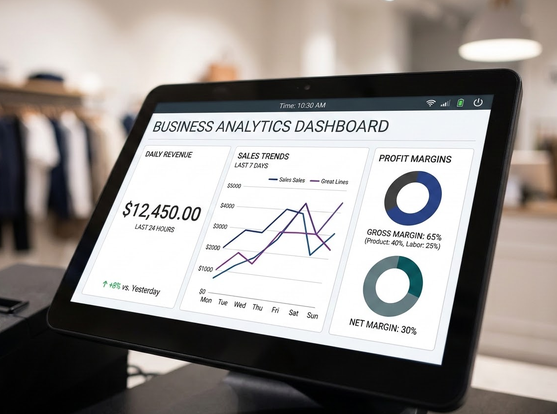
Advanced reporting on a POS terminal for a retail store delivers real-time visibility into sales trends, profit margins, and peak shopping hours. Retail merchants need actionable business intelligence to make smart purchasing decisions.
Basic transaction records are insufficient for optimizing inventory investment and staffing levels. Scalable architecture ensures your checkout system expands as your store grows.
Adding new registers, employees, or retail locations should not require replacing your core platform. Key analytics capabilities include:
- Real-time sales dashboards: Live tracking of daily revenue and transaction counts.
- Product margin analysis: Detailed reports showing top-selling items and profit contribution.
- Peak hour performance: Hourly sales breakdowns to optimize employee work schedules.
- Multi-store management: Centralized data access for managing multiple retail locations.
How does Brava help merchants choose the ideal setup?
Brava simplifies selecting a POS terminal for a retail store by evaluating inventory volume, checkout speed, and local merchant needs in Puerto Rico. Instead of pushing rigid single-product options, Brava analyzes your specific retail workflow.
This consultative approach ensures you receive the exact hardware and software combination required for your store size. Brava recommends tailored checkout solutions:
- Clover Station Duo: High-performance setup with dual screens and integrated scanning for busy retail stores.
- Clover Mini: Compact countertop system delivering full POS power in small retail footprints.
- Clover Flex: Portable handheld device ideal for line busting, inventory audits, and floor sales.
- FD-150 terminal: Simple and secure payment terminal for straightforward countertop checkout needs.
- Aldelo and Bitrix24: Specialized software integrations for complex retail and commercial management.
Brava provides initial inventory uploading, hardware installation, staff training, and local support in Puerto Rico. This comprehensive assistance guarantees your technology delivers immediate operational value.
Conclusion
Selecting a POS terminal for a retail store involves evaluating processing speed, peripheral compatibility, inventory tracking, cashier usability, and system scalability. Focusing on these operational criteria helps you choose hardware that eliminates checkout bottlenecks.
A well-designed checkout setup improves inventory accuracy, reduces cashier mistakes, and elevates customer satisfaction. Partnering with a dedicated local provider ensures your retail store receives ongoing technical support and long-term value.
FAQ
Choose a POS terminal for a retail store by evaluating card processing speed, barcode scanner integration, matrix inventory management, and cashier interface usability. Also verify local technical support and hardware scalability.
Barcode scanner integration is important for retail checkout because it eliminates manual typing errors. It also speeds up item scanning and automatically updates inventory records in real time.
A retail checkout terminal should accept credit cards, debit cards, contactless NFC payments, Apple Pay, and Google Pay. In Puerto Rico, supporting ATH Móvil and ATH Móvil Business is essential.
Brava assists retail store owners by assessing their operational needs and recommending tailored Clover POS hardware. We handle inventory uploading, staff training, and local technical support in Puerto Rico.